

Creating accurate estimates and collecting payments are two of the most important parts of running a contracting business. However, preparing quotes manually, tracking approvals, updating change orders, and following up on estimates can consume hours every week.
The best estimating and invoicing software for contractors connects the entire process. Contractors can create an estimate, send it for approval, schedule the work, generate an invoice, and collect payment without repeatedly entering the same information.
We compared four leading platforms based on their estimating tools, invoicing features, contractor-specific workflows, mobile access, pricing, and overall ease of use.
Quick answer: What is the best estimating and invoicing software for contractors?
Clientility and Joist are our top choices for estimating and invoicing software for contractors. Joist is a strong option for solo contractors with a limited workflow who mainly need estimates and invoices. However, contractors who want more value for their buck, including scheduling, job costing, change orders, payments, customer and job management, and milestone payments, may find Clientility to be the better overall option.
Quick comparison
| Software | Best for | Starting price | Main strength |
|---|---|---|---|
| Clientility | Small to medium-sized businesses that want more value for their buck | $45/month | Feature-rich estimate-to-payment and job-management workflow |
| Joist | Solo contractors with a limited workflow | $10/month | Simple, affordable estimating and invoicing |
| Jobber | Small and growing field-service businesses | $49/month | Strong quoting, scheduling, and job management |
| Housecall Pro | Small and growing field-service businesses | $79/month | Estimating, scheduling, dispatching, and payments |
How we selected the top four platforms
We evaluated each platform using criteria that matter to contractors:
- Estimate creation and customization
- Cost, markup, and pricing tools
- Digital estimate approval
- Estimate-to-invoice conversion
- Deposits and progress payments
- Change-order management
- Invoice tracking and reminders
- Online payment collection
- Mobile usability
- Scheduling and job management
- Overall price and value
The best choice depends on whether you need a focused estimate and invoice app or a complete platform for running your contracting business.
1. Clientility — best overall estimating and invoicing software for contractors
Best for: Solo contractors and small to medium-sized service businesses that want affordable, all-in-one software.
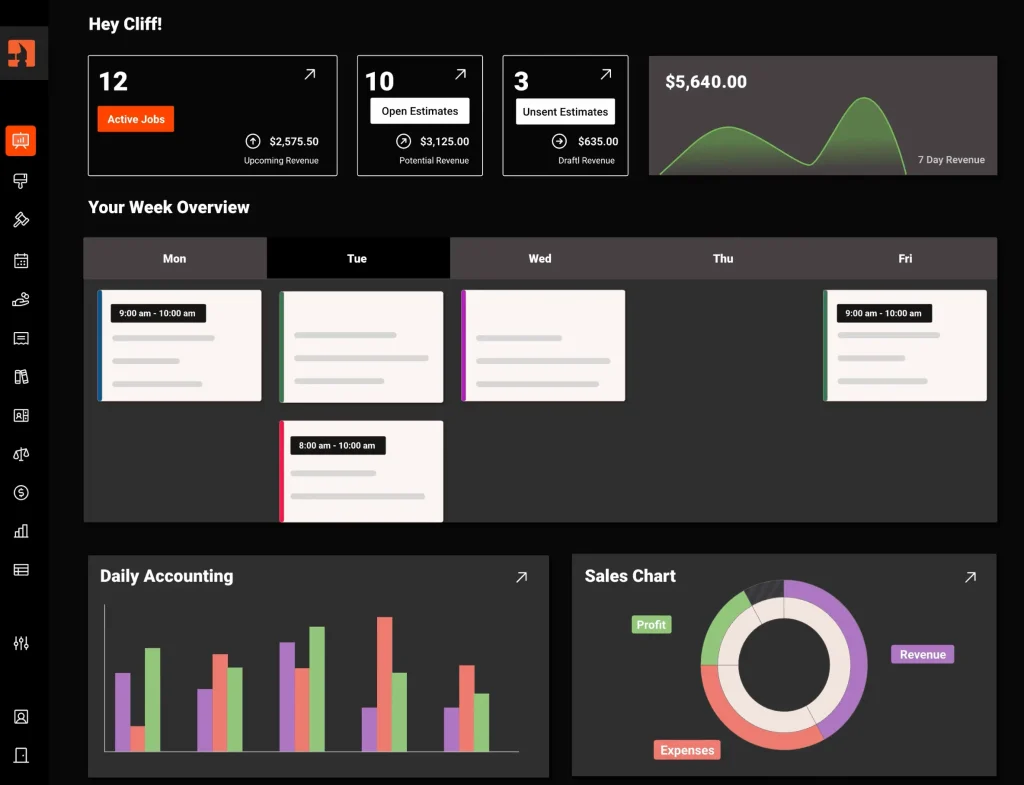
Clientility is our top overall choice for contractors because it combines estimating and invoicing with the rest of the contractor workflow while offering strong value for your buck. From one platform, users can manage leads, create estimates, collect customer approvals, schedule jobs, issue change orders, generate invoices, and accept payments.
Its estimating tools support photos, custom branding, line-item discounts, optional upgrades, and good-better-best packages. Contractors can also add costs and markups to line items to see the projected profit while building an estimate.
Clientility is particularly useful for projects where the original scope may change. Contractors can create a change order and send it to the customer for approval. Once approved, the contract price and invoice are updated automatically.
For billing, Clientility supports deposits, milestone payments, final balances, payment tracking, and automatic reminders for outstanding invoices. Through the client portal, customers can review estimates, approve changes, follow project updates, view invoices, and make payments online. After the job is complete, Clientility can also send Google review requests to help contractors strengthen their online reputation.
Key features
- Professional estimates with online approval
- Good-better-best estimate packages
- Pricebook with saved products and services
- Costs, markups, and projected profitability
- Estimate follow-up automation
- Change-order management
- Invoices and payment tracking
- Deposits and milestone payments
- Automatic payment reminders
- Customer portal
- Scheduling and job management
- QuickBooks integration
- Job costing and expense tracking
- Mobile access
Pricing
Clientility starts at $45 per month for an individual contractor. Its Team plan starts at $75 per month and includes up to five users. A 14-day free trial is available without a credit card.
Advantages
- Covers the complete process from lead to final payment
- Strong estimating and change-order functionality
- Core tools are included at an affordable starting price
- Supports milestone billing for larger projects
- Includes scheduling, customer management, and job costing
- Designed specifically for contractors and service businesses
Our verdict
Clientility offers the strongest overall balance of estimating, invoicing, payments, customer management, and affordability. It is a particularly good option for contractors who want one system instead of separate applications for quoting, scheduling, job tracking, and billing.
Read our complete Clientility review for a closer look at its features and pricing.
2. Joist — best for solo contractors and simple invoicing
Best for: Independent contractors who mainly need an affordable way to create estimates and invoices.
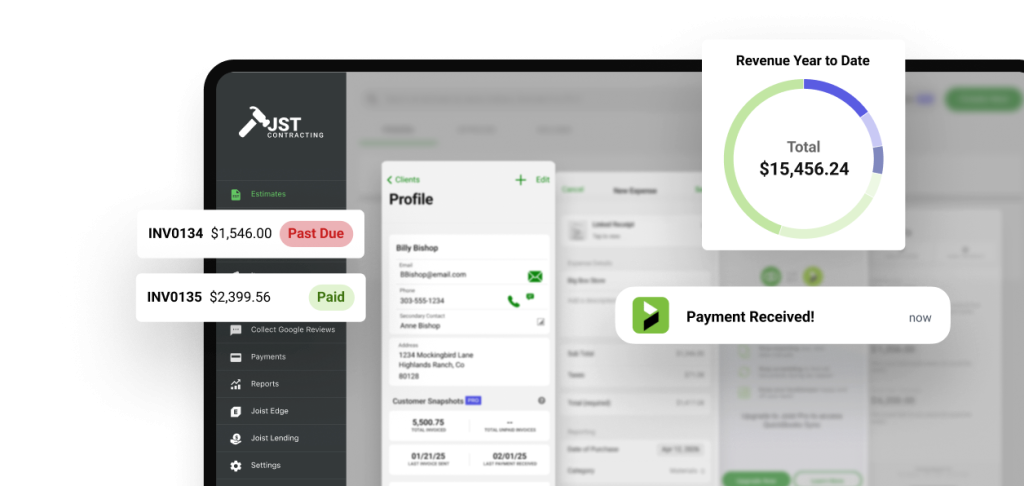
Joist is purpose-built for contractors who want to create professional estimates and invoices from a phone or computer. Its focused feature set makes it a practical option for solo operators who do not need a complete field-service management platform.
Contractors can create itemized estimates, attach photos, request deposits, collect signatures, and generate work orders. Customers can then pay online using the available payment methods.
Joist’s simplicity is one of its biggest advantages. The software focuses on quoting and billing without introducing scheduling, dispatching, and team management found in larger platforms.
Key features
- Professional estimates and invoices
- Deposits and payment schedules
- Online payments
- Contracts and electronic signatures
- Photos and custom branding
- Work-order generation
- QuickBooks integration
- Change-order management on the Elite plan
- Mobile and web access
Pricing
Joist’s Basics plan starts at $10 per month, although it is limited to five documents per month. The Pro plan costs $17 per month and includes unlimited documents and customers. The Elite plan costs $32 per month and adds change-order management, business reports, and other tools.
Annual billing discounts and a 14-day free trial are available.
Advantages
- Affordable starting price
- Built specifically for contractors
- Simple mobile experience
- Estimates and invoices
- Useful for contractors working primarily on their own
- No need to purchase a larger field-service platform
Consider before choosing
Joist is mainly an estimating and invoicing product. Companies that need scheduling, dispatching, employee management, or detailed job workflows may require a broader platform.
Our verdict
Joist is a strong estimating and invoicing option for solo contractors who want an affordable, focused platform that is simple to learn and easy to use.
3. Jobber — best for small and medium-sized service businesses
Best for: Small and medium-sized service businesses that need estimating, invoicing, scheduling, and customer management.
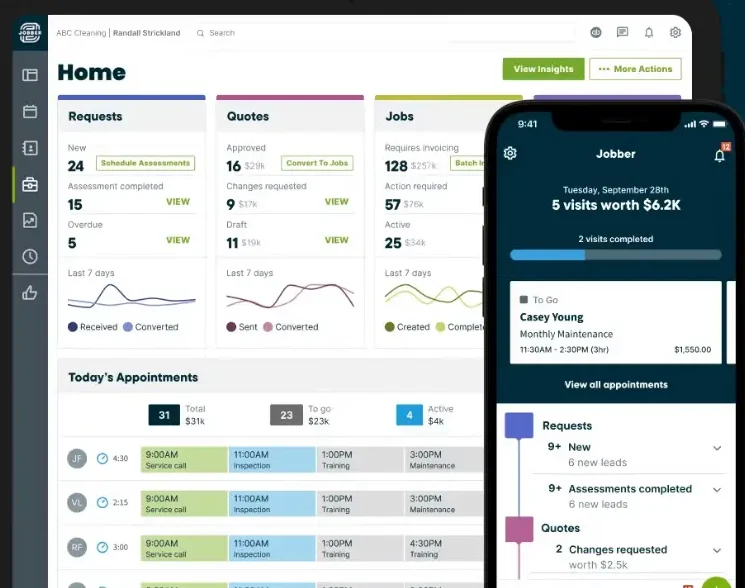
Jobber combines quoting and invoicing with a broader collection of field-service management tools. Contractors can create professional quotes, collect customer approvals, schedule the approved work, assign employees, generate invoices, and accept online payments.
Its quote builder supports signatures, optional line items, costs, and markups. Contractors can also automate follow-ups when a customer has not responded to a quote.
Jobber’s client hub gives customers one place to approve quotes, review appointments, view invoices, and make payments.
Key features
- Customizable quotes and invoices
- Customer signatures and quote approvals
- Optional products and services
- Costs and markups
- Automated quote follow-ups
- Scheduling and employee assignment
- Customer management
- Client portal
- Progress invoicing
- Online card and bank payments
- Automated invoice reminders
- QuickBooks Online integration
- Mobile application
Pricing
Jobber’s Core plan costs $49 per month when billed monthly. Annual billing options and introductory offers may reduce the effective monthly price.
Some features, including automated quote and invoice follow-ups, QuickBooks integration, job costing, and advanced quote customization, require higher-priced plans.
Advantages
- Combines quoting, scheduling, invoicing, and payments
- Polished customer portal
- Strong mobile access
- Suitable for businesses with field employees
- Supports progress invoicing
- Large selection of integrations
Consider before choosing
Jobber’s starting plan covers basic quotes and invoices, but several useful automation and profitability features are reserved for higher plans. Contractors should compare the plan limits carefully before subscribing.
Our verdict
Jobber is a strong choice for growing service businesses that need more than a simple estimate and invoice app. Its scheduling, customer communication, and job-management tools make it especially useful for companies coordinating several employees or appointments.
4. Housecall Pro — best for small and growing field-service businesses
Best for: Small and medium-sized service businesses that need estimating, invoicing, scheduling, and customer management.
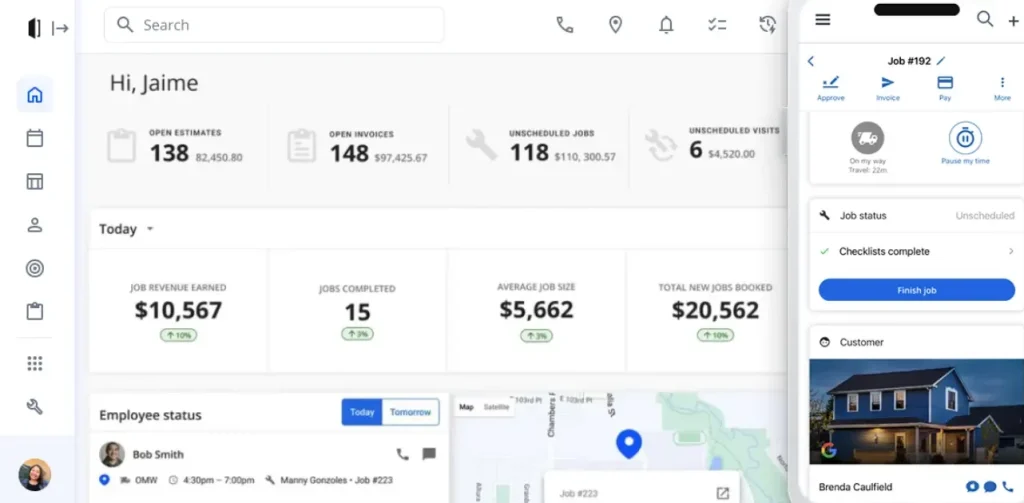
Housecall Pro provides estimates and invoicing as part of a broader field-service management system. Its tools cover online booking, scheduling, customer management, payments, reviews, and technician management.
Contractors can send estimates, create invoices, collect payments in the field, and automate invoice reminders. The platform also includes a pricebook to help businesses keep services and pricing consistent.
Housecall Pro is particularly useful for companies that receive frequent service calls and need to coordinate technicians throughout the day.
Key features
- Estimates and invoices
- Online payments
- Pricebook management
- Scheduling and dispatching
- Online customer booking
- Customer notifications
- Job costing
- Review management
- Mobile app
- QuickBooks integration
Pricing
Housecall Pro’s Basic plan costs $79 per month. The platform offers a 14-day free trial.
Higher-tier plans add more tools, including route planning, pipeline, QuickBooks integration, and job costing.
Advantages
- Broad range of home-service management tools
- Strong scheduling and dispatching capabilities
- Supports online and in-field payments
- Customer online-booking tools
- Pricebook and job-costing features
- Suitable for businesses managing service technicians
Consider before choosing
Housecall Pro costs more than basic estimating and invoicing software. Solo contractors with a limited workflow may find Joist more affordable, while those who want a broader range of contractor-management features may get better value for their buck with Clientility.
Our verdict
Housecall Pro is a strong option for established home-service companies that need estimating and invoicing alongside scheduling, dispatching, and technician management.
Which estimating and invoicing software should you choose?
Choosing the best estimating and invoicing software for contractors depends on the size of your business, your budget, and the complexity of your workflow.
Choose Clientility if you want the best overall combination of estimates, change orders, invoicing, payments, scheduling, and job costing at an affordable price.
Choose Joist if you are a solo contractor who mainly needs simple, professional estimates and invoices.
Choose Jobber if you manage a growing field-service team and need strong scheduling, automation, and customer-management tools.
Choose Housecall Pro if you operate a home-service company that relies heavily on booking, dispatching, and technician coordination.
Before subscribing, use a free trial to create a real estimate, revise it, convert it into an invoice, and record a payment. Testing the complete workflow is the best way to determine whether the software fits your business.
Contractors who need more than estimating and invoicing can also read our comparison of the best field service software for service businesses.
Frequently Asked Questions:
What is the best estimating and invoicing software for contractors?
The best estimating and invoicing software for contractors depends on the size and workflow of the business. Clientility provides a broad set of estimating, invoicing, scheduling, payment, and job-management tools, while Joist is a simpler option for solo contractors with limited workflows.
How do I choose estimating and invoicing software for my contracting business?
Compare each platform’s estimating tools, digital approvals, invoicing, payment options, mobile access, integrations, and job-management features. You should also determine which features are included in the advertised plan and which require an upgrade.
Is estimating and invoicing software worth it for a small contracting business?
Estimating and invoicing software may be worthwhile if preparing quotes, tracking approvals, updating project prices, and creating invoices take up significant time. The right platform can organize the workflow and reduce repeated data entry, but its value depends on how often the business uses its features.
[…] Field Service Scheduling Software Improves Business Efficiency: 4 Great Options to Consider 4 Best Estimating and Invoicing Software for Contractors 5 Essential Field Service Tips Every Beginner Should Know Before Entering the Field […]