

If you’re exploring Housecall Pro alternatives, you’re probably looking for software that better fits the way your business operates. Housecall Pro is a popular choice among home service businesses, and for good reason. It brings scheduling, dispatching, estimates, invoicing, and customer management into one platform. For a busy contractor, having those tools in one place can make a noticeable difference.
But being a popular choice doesn’t necessarily make it the right choice for every business.
Maybe you’ve outgrown your current plan. Maybe you’re paying for features you barely touch. Or perhaps Housecall Pro handles your day-to-day scheduling just fine, but you’re looking for something better suited to how you estimate projects, communicate with customers, or manage your team.
Whatever brought you here, switching business management software isn’t a decision to make lightly. Moving customer records, rebuilding your pricebook, and getting employees comfortable with a new system all take time.
We’ve narrowed the search to four options worth considering in 2026, looking beyond the usual feature lists to examine where each platform makes sense and where you might run into limitations.
Why Look for an Alternative to Housecall Pro?
Housecall Pro offers a solid collection of tools for managing a home service business, but that doesn’t mean its approach works equally well for every contractor. The way a plumbing company handles daily service calls can look very different from how a general contractor manages a renovation project, and those differences matter when choosing software.
Some contractors may need more flexibility when preparing estimates, tracking expenses, or keeping customers updated throughout longer projects. Others might prioritize recurring scheduling, employee management, or integrating with the accounting tools they already use. Even something as simple as how easily employees can navigate the mobile app can influence whether a platform works well for a business.
Pricing is another consideration. Housecall Pro’s Basic plan starts at $79 per month for one user, while its Essentials plan costs $229 per month for an individual or $299 per month for a team of five. Features such as job costing and QuickBooks Online integration are available on Essentials and higher, meaning businesses may need to upgrade to access certain tools.
Ultimately, finding the right software comes down to how well it fits your day-to-day operations. Rather than looking for a platform with the longest feature list, it’s worth considering which one offers the tools your business actually needs, at a price that makes sense.
4 Best Housecall Pro Alternatives at a Glance
We’ve selected four platforms worth considering, each with a different approach to helping contractors run their businesses. The table below gives you a quick overview of their strengths and starting prices, so you can narrow down which ones are worth exploring further.
| Software | Best For | Starting Price |
|---|---|---|
| Jobber | Scheduling, recurring jobs, and customer management | $49/month |
| Clientility | All-in-one service software, flexible estimating, and customer notifications | $45/month |
| Workiz | Call management and technician dispatching | Contact sales |
| FieldPulse | Growing trade businesses needing flexible field operations | Custom pricing |
Prices are in USD and reflect monthly billing where publicly available. Features and user limits vary by plan.
Starting prices only tell part of the story. What matters just as much is what you get for that price, how the software handles the work you do most often, and whether you’ll need to pay extra as your business grows. We’ll break down those details for each platform below.
1. Jobber: Best for Scheduling and Recurring Service Businesses
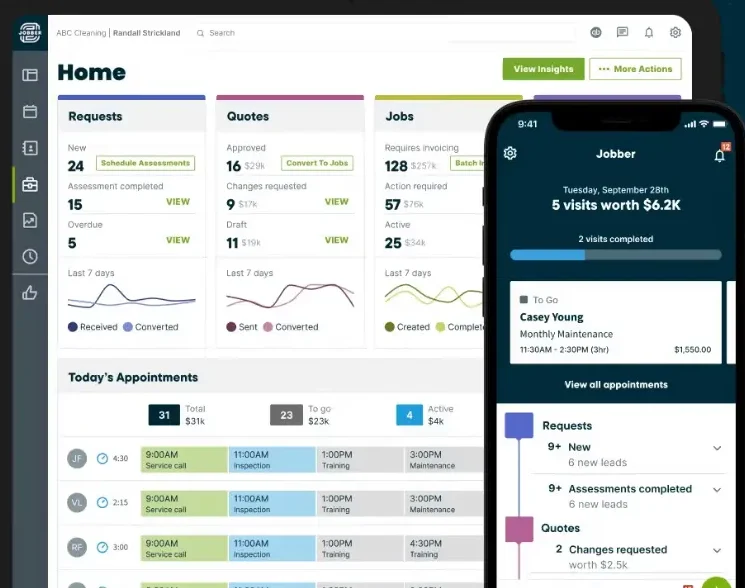
Jobber is one of Housecall Pro’s most established competitors, offering tools to help contractors manage scheduling, customer relationships, estimates, invoices, and payments. It’s used across a wide range of home service industries, including landscaping, cleaning, HVAC, plumbing, and general contracting.
One of Jobber’s strengths is its ability to manage recurring work. For example, a landscaping company servicing 50 properties can schedule regular maintenance visits, assign employees, and keep track of upcoming appointments without manually creating the same jobs every week.
Beyond scheduling, Jobber provides a client hub where customers can approve quotes, review appointments, and pay invoices.
However, while Jobber offers an extensive collection of features, what you can actually use depends heavily on which subscription you choose.
Jobber Features: What’s Included in Each Plan?
Jobber divides its features across four main plans: Core, Connect, Grow, and Plus. Each builds on the previous plan, with more advanced capabilities becoming available as you upgrade.
Core: The essentials for running a service business
Core covers the fundamental tools contractors need to manage their daily operations. Users can schedule jobs, create and send quotes, issue invoices, accept online payments, and access basic performance reporting.
It also includes access to Jobber’s app marketplace, allowing businesses to connect with supported third-party applications.
However, Core does not include several features that contractors might expect from a complete management platform, such as automated quote and invoice follow-ups, QuickBooks Online synchronization, automatic time tracking, or job costing.
Connect: More automation and customer communication
Connect includes everything in Core while introducing features designed to reduce administrative work.
Contractors can send automated customer reminders, follow up on quotes and invoices, collect payments automatically, and use checklists to standardize job documentation.
It also adds QuickBooks Online synchronization and tools for tracking time and expenses.
For businesses that regularly send estimates or manage several appointments each day, these additions can be useful.
However, Connect still doesn’t include profitability tracking through job costing, advanced quote customization, two-way SMS, or custom workflow automations.
Grow: Advanced estimating and job profitability
Grow builds on Connect with more detailed estimating and operational tools.
Contractors can customize quotes with richer visuals, offer optional line items to upsell additional services, and track profitability through job costing.
It also includes automatic time tracking, two-way customer texting, and custom workflow automations.
These features may be particularly valuable for contractors handling larger projects or wanting more visibility into their job costs.
However, businesses looking for crew scheduling tools, advanced reporting, a dedicated pipeline, and capabilities would need to consider Jobber’s highest-tier plan.
Plus: Additional tools for larger teams
Plus includes everything in Grow, along with capabilities intended for businesses managing more complex operations.
These include crew scheduling, team mentions, advanced reporting, pipeline management, and automated expense capture with profitability alerts.
The plan also includes Jobber’s Marketing Suite, an AI-powered receptionist, dedicated onboarding, and premium support.
For companies with several employees and more complicated workflows, these tools may be worth exploring.
Jobber Pricing: How Much Does It Actually Cost?
Jobber’s pricing changes depending on your team size and whether you choose monthly or annual billing.
For contractors working independently, the monthly plans are:
| Plan | Monthly Price | Included Users |
|---|---|---|
| Core | $49 | 1 |
| Connect | $139 | 1 |
| Grow | $199 | 1 |
For businesses with two to five employees, Jobber offers the following team plans:
| Plan | Monthly Price | Included Users |
|---|---|---|
| Connect | $199 | Up to 5 |
| Grow | $299 | Up to 5 |
| Plus | $499 | Up to 5 |
All prices are in USD and reflect monthly billing as of October 2026.
Is Jobber a Good Housecall Pro Alternative?
Jobber is a strong option for businesses that prioritize organized scheduling, recurring appointments, and customer management. Its established integration marketplace and range of automation tools also make it appealing to contractors who want to connect different parts of their operations.
Its main drawback is how certain features are distributed across its pricing plans. While Core provides an affordable starting point, contractors needing job costing, advanced estimating, or more comprehensive team management may find themselves paying considerably more.
For landscaping companies, cleaning businesses, and other service providers managing a steady flow of repeat work, Jobber is certainly worth considering. Just make sure the plan you’re comparing includes the features your business actually needs.
2. Clientility: Best for Affordable, All-in-One Contractor Management
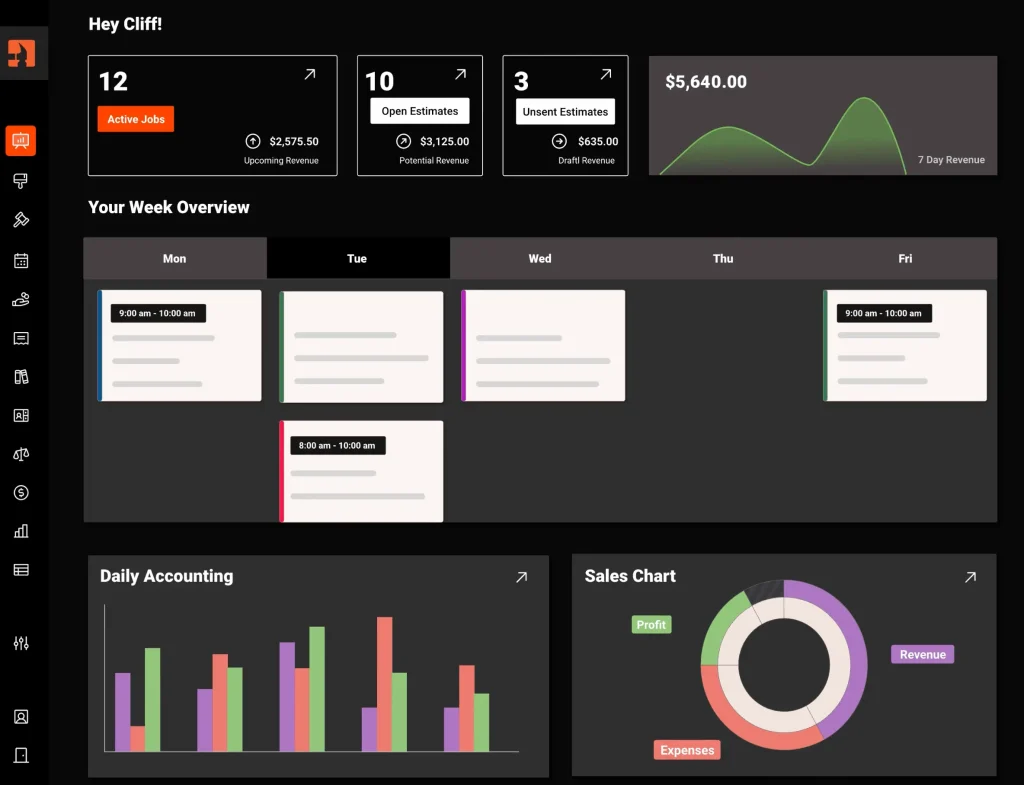
Clientility is a field service management platform designed for independent contractors and small- to medium-sized home service businesses. It brings together lead management, estimating, scheduling, invoicing, customer communication, and job management without requiring users to upgrade to more expensive plans to access essential features.
Unlike platforms that distribute advanced tools across several pricing tiers, Clientility takes a simpler approach. Its Individual plan includes nearly all the platform’s core features, while the Team plan introduces employee management capabilities for businesses with multiple workers.
This makes Clientility particularly appealing to painting contractors, electricians, landscapers, renovation companies, and other service providers looking to manage their operations without paying for features they don’t need.
Clientility Features: What’s Included in Each Plan?
Clientility offers two main plans: Individual and Team.
The biggest difference between them isn’t access to estimating, invoicing, or customer management tools. It’s whether the business needs employee-related functionality.
Individual: Business management for solo contractors
The Individual plan includes Clientility’s core features, including lead management, estimates, automated follow-ups, scheduling, invoicing, customer notifications, and the client portal.
Contractors can create estimates, manage jobs, collect payments, organize their pricebook, track expenses, and access business analytics.
Unlike some competing entry-level plans, these capabilities aren’t separated into several subscription tiers.
However, the Individual plan does not include employee-specific features such as assigning workers to scheduled jobs, employee dashboards, timesheets, or payroll management.
For contractors working independently, these limitations may not matter since they don’t have employees to manage.
Team: Additional tools for managing employees
Business owners can assign employees to jobs and scheduled events, manage employee access through the Worker Portal, track working hours using timesheets, and handle payroll within the platform.
The Team plan also includes employee dashboards and permission settings, allowing business owners to control what each team member can access.
For businesses with multiple employees working across different job sites, these additional tools make it easier to coordinate daily operations without relying on separate systems.
Clientility is also working on expanding its functionality with live GPS tracking and a mobile phone system, although these features are not yet available.
Clientility Pricing: How Much Does It Cost?
Clientility keeps its pricing straightforward, with two monthly plans based on whether you’re working independently or managing a team.
| Plan | Monthly Price | Included Users |
|---|---|---|
| Individual | $45/month | 1 |
| Team | $75/month | Up to 5 |
All prices are in USD and reflect monthly billing as of October 2026.
Additional users on the Team plan cost $10 per month each. Both plans come with a 14-day free trial, and no credit card is required to get started.
One of the biggest differences between Clientility and some of its competitors is that the Individual plan includes the same core business management features as Team, excluding employee-related functionality.
For example, a solo contractor paying $45 per month can access estimating, automated follow-ups, lead management, scheduling, invoicing, job costing, and customer communication tools without upgrading.
The Team plan increases the price to $75 per month and adds employee scheduling, timesheets, payroll, and worker management capabilities for up to five users.
Prices are in USD and reflect monthly billing as of October 2026.
Is Clientility a Good Housecall Pro Alternative?
Clientility is worth considering for small to medium-sized service businesses that want a comprehensive set of management tools without navigating multiple subscription upgrades.
Its flexible estimating options, automated follow-ups, client portal, change orders, and milestone payments are particularly useful for contractors managing projects that involve more than a single service appointment.
The straightforward pricing is another advantage, especially for businesses with several employees. However, companies requiring highly specialized dispatching systems, extensive third-party integrations, or enterprise-level functionality should confirm that Clientility supports their specific needs.
For contractors looking to manage everything from the initial customer inquiry to the final payment, Clientility offers a practical and affordable alternative to Housecall Pro.
3. Workiz: Best for Call Management and Technician Dispatching

Workiz is a field service management platform designed for businesses that handle frequent customer calls, service requests, and technician appointments. It’s particularly suited to locksmiths, plumbers, HVAC companies, and appliance repair businesses.
Alongside scheduling, estimates, invoicing, and customer management, Workiz places a strong emphasis on communication. For service companies dealing with emergency calls or last-minute bookings, keeping customer conversations connected to scheduling and dispatching can make a considerable difference.
Workiz Features: What’s Included in Each Plan?
Workiz offers three main plans, with more advanced automation, reporting, and operational tools available as businesses upgrade.
Standard: Core business management
Standard includes scheduling, jobs, estimates, invoicing, online payments, customer management, built-in reports, QuickBooks integration, custom fields, service areas, and subcontractor management.
The plan also includes up to five automations.
However, custom reporting, performance pay, advanced scheduling tools, inventory management, and equipment tracking are not included.
Pro: Additional automation and reporting
Pro includes everything in Standard, along with performance pay, custom reports, Genius Leads, and Genius Scheduling.
It also increases the total number of automations from five to ten.
While Pro introduces more advanced capabilities for managing customer inquiries and scheduling, businesses requiring inventory management, service plans, multi-day jobs, or equipment tracking would need to consider Ultimate.
Ultimate: More advanced operational tools
Ultimate includes everything in Pro, along with inventory management, service plans, sales proposals, flat-rate pricing, checklists, and multi-day job management.
These capabilities are more relevant to businesses managing complicated operations or requiring greater control over their jobs and resources.
Workiz Pricing: How Much Does It Cost?
Workiz does not publicly display fixed monthly subscription prices for its three main plans. Instead, businesses need to request pricing directly.
| Plan | Pricing | Included Automations |
|---|---|---|
| Standard | Request pricing | 5 |
| Pro | Request pricing | 10 |
| Ultimate | Request pricing | 30 |
Additional services such as Genius Phone and Genius Answering may involve separate charges, so it’s worth requesting a quote that includes all the features your business intends to use.
Because pricing is customized, contractors should also confirm user limits, additional employee costs, and any applicable usage fees before committing.
Is Workiz a Good Housecall Pro Alternative?
Workiz is worth considering for service businesses where incoming calls, appointment booking, and technician dispatching are a major part of daily operations. Its communication-focused tools can be particularly useful for companies handling urgent requests or high call volumes.
However, some of its standout communication capabilities are sold separately, while features such as inventory management, equipment tracking, and multi-day jobs require Ultimate.
For locksmiths, plumbers, HVAC companies, and other call-heavy service providers, Workiz offers an alternative worth exploring. Contractors with simpler scheduling needs or longer project-based workflows may find a different platform more suitable.
4. FieldPulse: Best for Growing Trade Businesses
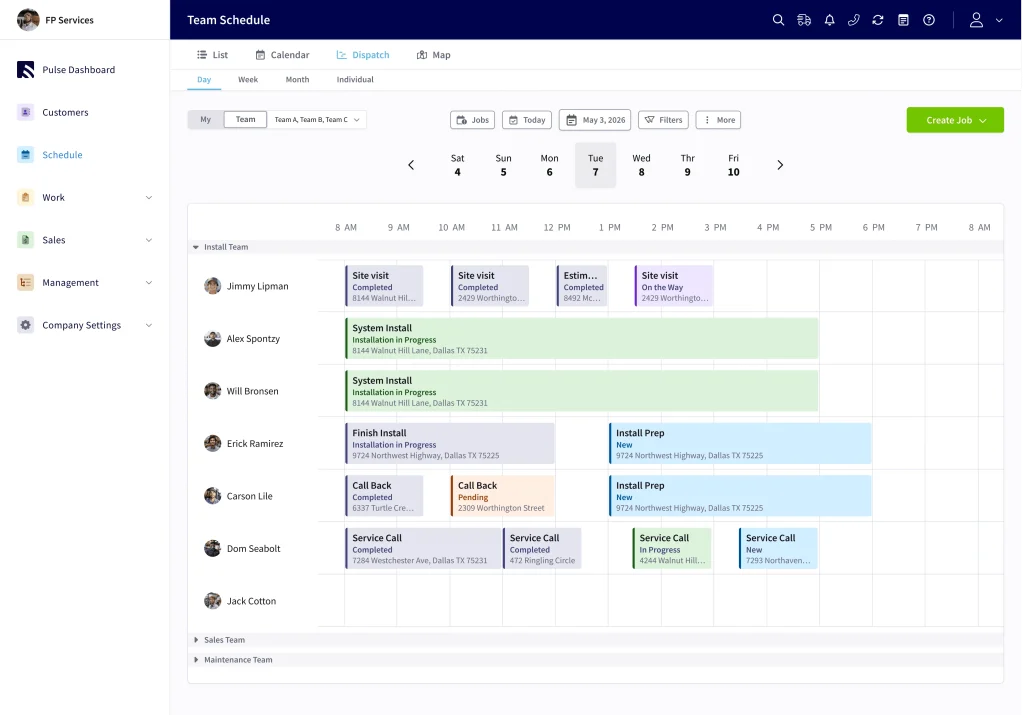
FieldPulse is one of the Housecall Pro alternatives worth considering for trade businesses looking to manage their jobs, employees, and customer relationships in one place. It’s particularly relevant to HVAC, plumbing, electrical, and other service companies managing multiple technicians and increasingly complex operations.
Like Housecall Pro, FieldPulse covers scheduling, dispatching, estimates, invoicing, and payments. However, it places particular emphasis on customizable workflows, standardized pricing, and tools that help businesses coordinate their teams as they grow.
FieldPulse Features: What’s Included?
Unlike Jobber, Clientility, and Workiz, FieldPulse doesn’t publicly divide its main software into several fixed subscription tiers. Instead, businesses receive pricing based on their requirements.
FieldPulse provides scheduling, dispatching, customer management, estimates, invoices, payments, and job tracking. Its mobile app allows technicians to view assignments, update job statuses, attach photos, and access customer information while working in the field.
Businesses can create detailed estimates and use Pricebook to standardize material, labor, and service costs.
FieldPulse offers additional products such as Operator AI, Chat AI, Engage business phone services, fleet tracking, financing, and custom forms.
These can expand the platform’s capabilities, but businesses should confirm which products are included in their quote and which require additional fees.
FieldPulse Pricing: How Much Does It Cost?
FieldPulse uses customized, seat-based pricing rather than publishing a fixed monthly subscription rate.
| Pricing Component | Details |
|---|---|
| Core software | Custom quote |
| Employee access | Seat-based pricing |
| Additional users | Depends on access requirements |
| Premium products | Optional, with potential additional fees |
Pricing depends on the number of users, the access each employee requires, and any additional products selected.
FieldPulse also emphasizes tailored onboarding, customized workflows, and implementation support.
While this approach allows businesses to request a package suited to their operations, it makes comparing costs with other software more difficult without contacting sales.
Is FieldPulse a Good Housecall Pro Alternative?
FieldPulse is worth considering for growing trade businesses that need more control over scheduling, technician assignments, pricing, and job workflows.
However, custom pricing and separately priced premium features mean contractors should carefully review the full subscription cost before committing.
For HVAC, plumbing, and electrical companies managing expanding teams, FieldPulse offers a flexible alternative to Housecall Pro.
Which Housecall Pro Alternative Should You Choose?
After comparing these four platforms, it’s clear that each offers something different. The best choice depends less on which software has the most features and more on how your business operates.
If you manage recurring appointments and need a reliable way to organize scheduling, Jobber is worth considering. Its established platform and integrations make it particularly appealing to landscaping, cleaning, and maintenance businesses.
For small to medium-sized service businesses looking for estimating, job management, automated customer communication, and employee management without expensive subscription upgrades, Clientility offers a more affordable approach.
Workiz is particularly relevant to businesses that rely on incoming calls and quick dispatching. Its phone and AI answering capabilities can be valuable for plumbers, locksmiths, and other service providers handling urgent requests.
Meanwhile, FieldPulse offers flexibility for growing trade businesses that need customizable workflows, advanced field management, and more control over how employees complete jobs.
Before making a decision, consider how many employees need access, which features you’ll use regularly, and what your total monthly cost will be. A lower starting price doesn’t always mean better value, especially when essential features require upgrading.
Final Thoughts
Switching field service software is a big decision, particularly when your customer records, estimates, schedules, and ongoing jobs are already organized in one system.
Housecall Pro remains a capable option, but it’s far from the only one. Whether you’re looking for more flexible estimating, better team management, stronger communication tools, or a subscription that makes more sense for your budget, there are alternatives worth exploring.
If estimating and billing are particularly important to your business, we’ve also compared the best estimating and invoicing software for contractors to help you explore more options.
The important thing is to look beyond feature lists and advertised starting prices. Take advantage of free trials where available, request demonstrations, and test the tasks you perform most often.
Ultimately, the best Housecall Pro alternative is the one that fits the way you work today while giving your business room to grow.
Frequently Asked Questions:
What are the best Housecall Pro alternatives in 2026?
Some of the best Housecall Pro alternatives in 2026 include Jobber, Clientility, Workiz, and FieldPulse. Each serves different business needs, from recurring scheduling and estimating to call management and customizable field operations.
Is there a cheaper alternative to Housecall Pro?
Yes. Housecall Pro’s Basic plan starts at $79 per month for one user, while Jobber starts at $49 per month and Clientility at $45 per month. However, available features vary by plan, so it’s important to compare what each subscription includes.
Which Housecall Pro alternative is best for small businesses?
Jobber and Clientility are both worth considering. Jobber is particularly useful for recurring services and scheduling, while Clientility offers estimating, automated follow-ups, job management, and customer communication tools for independent contractors and growing teams.